
How to register a payment application
As part of the process to receive your TREC or SREC-II payments you must register a payment application on this site.
*Please note that this process should occur after you have (1) received your certification from NJCEP, (2) created an account and registered a generator with PJM GATS, and (3) created an account here.
Please see the following directions to register a payment account;
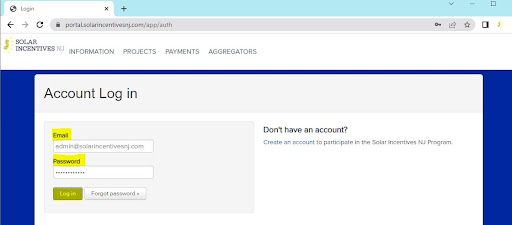
Navigate to https://www.solarincentivesnj.com and click, “Login”

Log in to your account by entering your email address and password
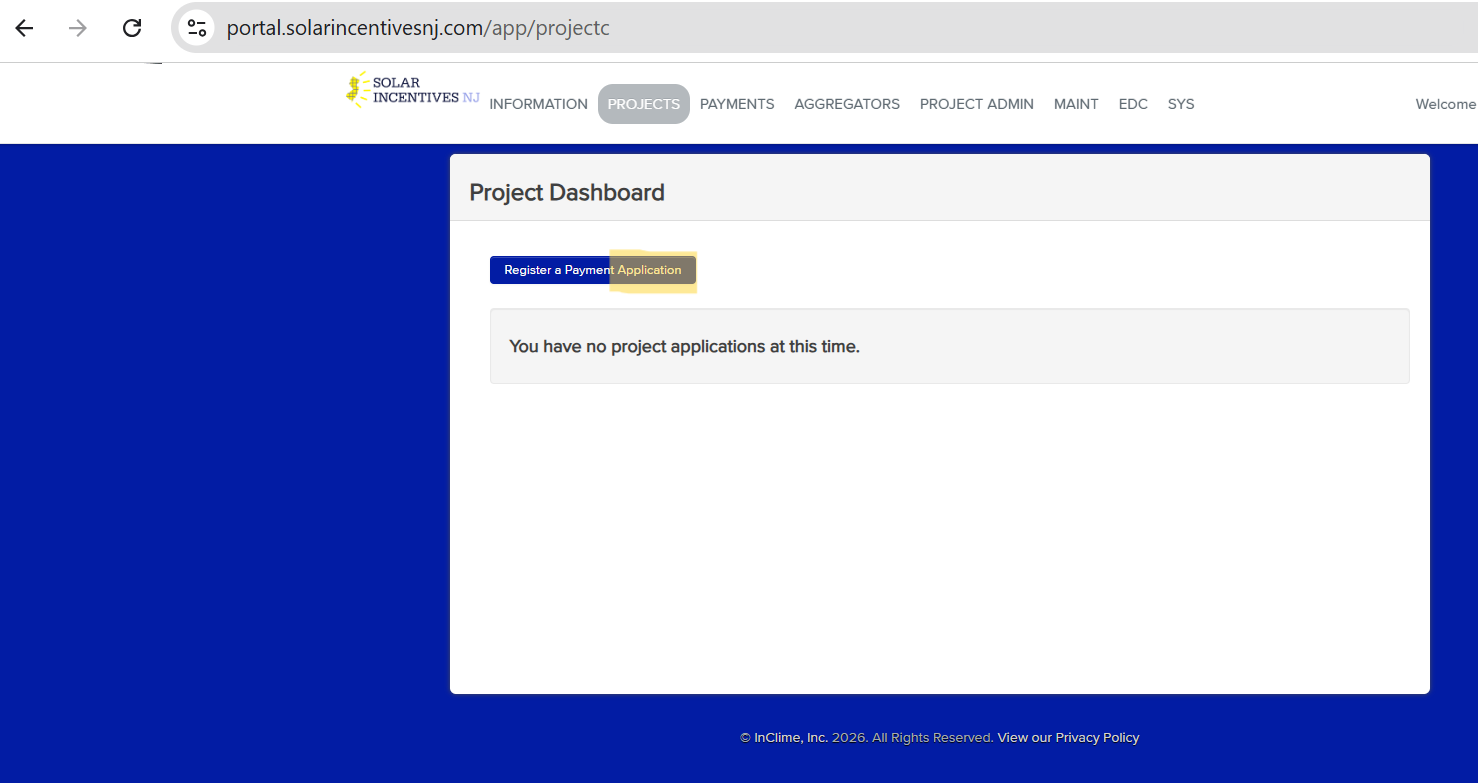
Select the “Projects” tab and then select, “Register a Payment Application”
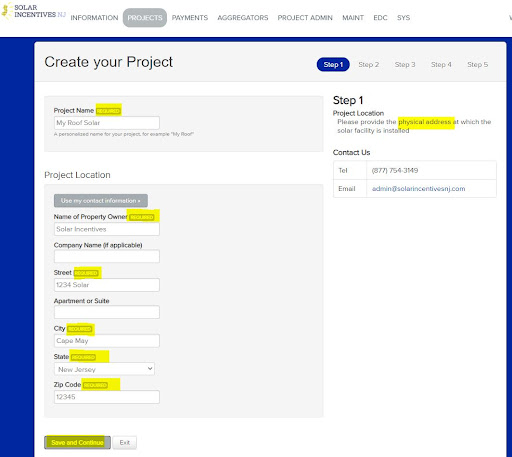
Step 1:
Enter the required information in Step 1 and click “Save and Continue”
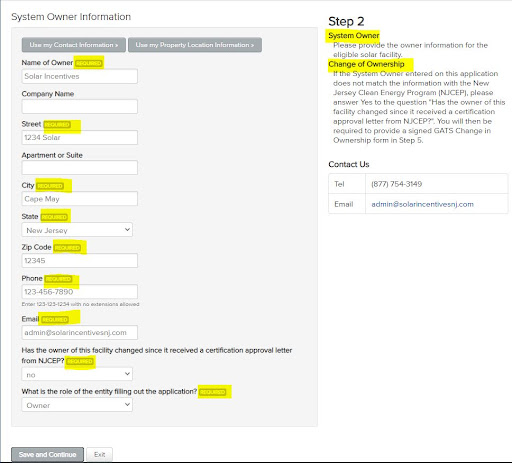
Step 2:
Enter the required information in Step 2 and click, “Save and Continue”.
Note: You may click “Use Contact Information” to use the name and address from your account, or “Use my Property Location Information” to use the information entered in Step 1. For the question: “Has the owner of this facility changed since it received a certification approval letter from NJCEP?”, If the System Owner entered on this application does not match the information with the New Jersey Clean Energy Program (NJCEP), please answer Yes to the question “Has the owner of this facility changed since it received a certification approval letter from NJCEP?”. You will then be required to provide a signed GATS Change in Ownership form in Step 5.
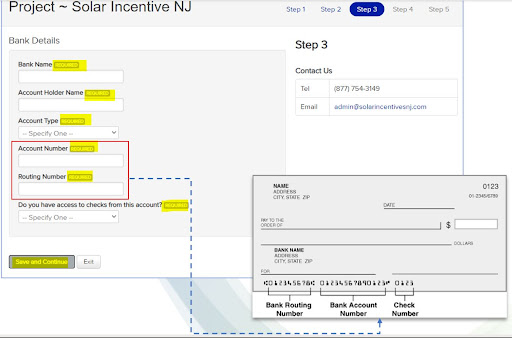
Step 3:
Enter the required information in Step 3 and click, “Save and Continue”.
Note: Enter the information for the account that you would like to receive your payments via direct deposit. Please also be aware that if you answer “Yes” to the question, “Do you have access to checks from this account?”, you will be required to upload a photo of a void check in Step 5.
Step 4:
Enter the required information in Step 4 and click, “Save and Continue”.
Note: NJ Certification Number: Each eligible solar facility is provided with NJ Certification Number on its NJCEP approval letter. This must begin with NJ-XXXXXX-SUN-I where X’s are numeric, then is followed by the project type code, and followed by either a “-TREC” or “-SREC-II” suffix which determines the facility’s program. View more information at Solar Incentives NJ FAQs
To receive a GATS Unit ID you must:
1) Create an account at www.pjm-eis.com
2) Register your solar facility as a generator with GATS using the system’s array details and NJ State Certification Number.

If you do not have this information you may click, “Exit” and the application will be saved at Step 4. Once you have the needed information, you may return to the application to complete it by going to the projects tab and selecting “Continue” next to the application in the Project Dashboard.

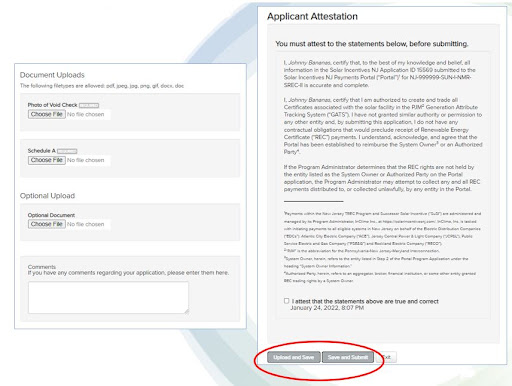
Step 5:
Upload the required documents and check the box next at the end of the Program Attestation and click, “Upload and Save” or “Save and Submit”.
Notes:
-Photo of Voided Check (Information should match details provided in Step 3)
-Schedule A (GATS form where a generator signs over permission to manage the RECS from their account to another party, Required for aggregators only)
-Optional Uploads (you are NOT required to upload anything here)
-Comments (Any notes that might help the program administrator process your payments more efficiently)
What happens next? Your payment application will be reviewed by our team to verify your system NJCEP certification and GATS registration as well as your banking information. If there are any questions we will reach out to you by email requesting more information as needed. Once outstanding issues have been resolved, we will register your application and you will receive an email confirmation. This email will also contain directions for submitting your first meter reading to PJM GATS.
You can check the status of your payment application by logging into your account at https://www.solarincentivesnj.com. Select the “Projects” tab at the top of the page. There, you will see a table showing all of your payment applications. If your payment application is in progress, you can click on the blue link, “Continue” under “Project Status” to complete the application. If information is needed for your application, the “Project Status” will be “Need Info.” and the “Information Needed” column will list the needed information. Please provide any needed information to us via email at [email protected].